Tuesday, November 5, 2024

SPF records (EMail)


Sender Policy Framework (SPF) is an email standard that pioneered the concept of domain-based email authentication. Below, we’ll walk you through everything you need to know about SPF, including what it is, how it works, limitations, and solutions.

What is SPF?

SPF prevents spoofing by enabling domain owners to allowlist IP addresses of servers that are authorized to send email on the domain’s behalf.

If a mail server with an IP address not on the list tries to send an email using that domain, it won’t pass SPF authentication.

How SPF email records work

Here’s a quick overview of how SPF works:

  1. Publish SPF record: Domain owners publish SPF records to the Domain Name System (DNS) that spell out the rule sets for their domains. An SPF record is plain text, and it can be as simple as a single line listing the IP addresses allowed to send an email on the domain’s behalf.
  2. Perform DNS lookup: When an email server receives an incoming email, it performs DNS lookups to retrieve the SPF record for a domain and examines the domain shown in the message’s Return-Path.
  3. Process SPF record: It will then process that SPF record to attempt to find the IP address of the sending server in the SPF record. This typically requires further DNS lookups to process parts of the SPF record linked in “include” statements. Notice the “include” statements in the above SPF record
  4. Pass or fail test: If there’s a match, the email passes the test and, in most cases, is delivered to the user’s inbox. If there is no match, the receiving server will treat the email as having failed SPF verification and will typically reject the message or add a flag to it, marking it as suspicious.

SPF risks and limitations

While SPF is better than nothing, it’s not a complete solution to protect your sending domains. Here are a few of the risks and limitations of SPF:

  1. Identifying and originating IP addresses for SPF records
  2. SPF 10 DNS lookup limit 
  3. SPF is spoofable
  4. Email SPF doesn’t survive email forwarding 

1. Identifying originating IP addresses for SPF records

SPF only lets you know that a message came from an approved IP address. But an approved IP address isn’t that easy to find. 

Shared systems like cloud platforms can host multiple cloud services that are dynamically assigned IP addresses at runtime. If the IP address identifies a service that you authorize, such as MailChimp, then anyone using the same IP address on that system could send messages that authorize with your SPF record.

2. SPF 10 DNS lookup limit 

The SPF standard limits the number of DNS lookups that mail servers will do when evaluating an SPF record. Before cloud services became common, 10 DNS queries were sufficient because most email messages were sent from applications hosted by the domain owner.

For modern cloud services, 10 lookups can go quickly, particularly because one lookup might contain other nested “include” statements requiring further DNS queries. When this article was published, G Suite’s “include _spf.google.com” actually comprised four different lookups because the SPF record at _spf.google.com contains three more lookups of its own.

Many folks implementing email authentication realize they must include all their cloud-sending services. To include them all means the SPF record exceeds the 10 DNS lookup limit. To mitigate the limitations of 10 domain lookups, they “flatten” the SPF record by pulling all the IP addresses of approved sending services forward into the primary SPF record.

Fluctuations in the IP addresses used by a cloud platform or sending service will require constant updates to the SPF record to prevent good email from being blocked. Some vendors attempt to cover any possible changes to IP address blocks used by cloud providers by specifying wide ranges in the SPF record—in tens of thousands to millions of IP addresses. Overly permissive IP blocks can allow fraudulent senders to send email on behalf of your domain, defeating the purpose of DMARC enforcement.

3. SPF is spoofable

SPF uses the domain shown in a message’s Return-Path field for authentication, not the “From:” address that humans can read. This creates a few issues:

  1. The “From:” address can still be spoofed.
  2. The Return-Path indicates where bounce messages should go, so the “From:” and Return-Path domains may differ. Most mail clients do not display the Return-Path address by default. For example, if you’re sending mail through a mailing list, the “From:” field might show your address, while the “Return-Path:” field shows the address of the email list.
  3. Phishers can use the general invisibility of “Return-Path:” when setting up their domains with their own SPF records. Then, they can send phishing emails with a company’s domain showing in the “From:” field but the phisher’s domain in Return-Path. Such messages are fake, but they will pass SPF authentication.

4. Email SPF doesn’t survive email forwarding 

SPF does not inherently support email forwarding. Any SPF records from senders trying to reach you through a forwarding address won’t validate because, to the receiving server, it looks like the message is coming from the forwarding server—not the source-identifying originating IP addresses.

SPF only lets you know that a message came from an approved IP address. This doesn’t always represent a one-to-one relationship. 

Shared systems like cloud platforms DMARCcan host multiple cloud services that are dynamically assigned IP addresses at runtime. Some could use the same IP address. Or if the IP identifies a service that you authorize, say MailChimp, then anyone using the same IP address on that system could send messages that authorize with your SPF record.

Get complete DMARC, DKIM, and SPF protection

SPF is an essential part of email authentication but wasn’t designed for the cloud era. On its own, SPF will not authenticate email. However, in the absence of a DMARC record, how receiving servers handle a message that fails SPF is entirely up to them.

Another most important exchange server term is DMARC record.
DMARC (Emails) in simple terms


Email authentication technologies SPF and DKIM were developed over a decade ago in order to provide greater assurance on the identity of the sender of a message. Adoption of these technologies has steadily increased but the problem of fraudulent and deceptive emails has not abated. It would seem that if senders used these technologies, then email receivers would easily be able to differentiate the fraudulent messages from the ones that properly authenticated to the domain. Unfortunately, it has not worked out that way for a number of reasons.

  • Many senders have a complex email environment with many systems sending email, often including 3rd party service providers. Ensuring that every message can be authenticated using SPF or DKIM is a complex task, particularly given that these environments are in a perpetual state of flux.
  • If a domain owner sends a mix of messages, some of which can be authenticated and others that can’t, then email receivers are forced to discern between the legitimate messages that don’t authenticate and the fraudulent messages that also don’t authenticate. By nature, spam algorithms are error prone and need to constantly evolve to respond to the changing tactics of spammers. The result is that some fraudulent messages will inevitably make their way to the end user’s inbox.
  • Senders get very poor feedback on their mail authentication deployments. Unless messages bounce back to the sender, there is no way to determine how many legitimate messages are being sent that can’t be authenticated or even the scope of the fraudulent emails that are spoofing the sender’s domain. This makes troubleshooting mail authentication issues very hard, particularly in complex mail environments.
  • Even if a sender has buttoned down their mail authentication infrastructure and all of their legitimate messages can be authenticated, email receivers are wary to reject unauthenticated messages because they cannot be sure that there is not some stream of legitimate messages that are going unsigned.

The only way these problems can be addressed is when senders and receivers share information with each other. Receivers supply senders with information about their mail authentication infrastructure while senders tell receivers what to do when a message is received that does not authenticate.

In 2007, PayPal pioneered this approach and worked out a system with Yahoo! Mail and later Gmail to collaborate in this fashion. The results were extremely effective, leading to a significant decrease in suspected fraudulent email purported to be from PayPal being accepted by these receivers.

The goal of DMARC is to build on this system of senders and receivers collaborating to improve mail authentication practices of senders and enable receivers to reject unauthenticated messages.

DMARC and the Email Authentication Process

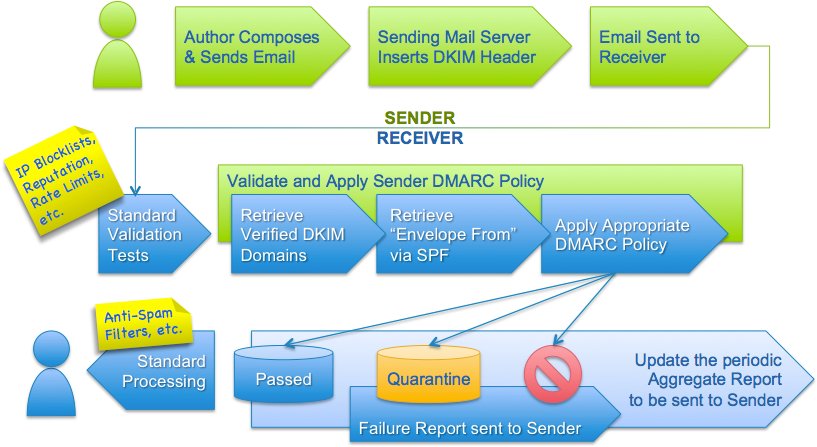
DMARC is designed to fit into an organization’s existing inbound email authentication process. The way it works is to help email receivers determine if the purported message “aligns” with what the receiver knows about the sender. If not, DMARC includes guidance on how to handle the “non-aligned” messages. For example, assuming that a receiver deploys SPF and DKIM, plus its own spam filters, the flow may look something like this:

DMARC authentication flowIn the above example, testing for alignment according to DMARC is applied at the same point where ADSP would be applied in the flow. All other tests remain unaffected.

At a high level, DMARC is designed to satisfy the following requirements:

  • Minimize false positives.
  • Provide robust authentication reporting.
  • Assert sender policy at receivers.
  • Reduce successful phishing delivery.
  • Work at Internet scale.
  • Minimize complexity.

It is important to note that DMARC builds upon both the DomainKeys Identified Mail (DKIM) and Sender Policy Framework (SPF) specifications that are currently being developed within the IETF. DMARC is designed to replace ADSP by adding support for:

  • wildcarding or subdomain policies,
  • non-existent subdomains,
  • slow rollout (e.g. percent experiments)
  • SPF
  • quarantining mail

Anatomy of a DMARC resource record in the DNS

DMARC policies are published in the DNS as text (TXT) resource records (RR) and announce what an email receiver should do with non-aligned mail it receives.

Consider an example DMARC TXT RR for the domain “sender.dmarcdomain.com” that reads:

"v=DMARC1;p=reject;pct=100;rua=mailto:postmaster@dmarcdomain.com"
In this example, the sender requests that the receiver outright reject all non-aligned messages and send a report, in a specified aggregate format, about the rejections to a specified address. If the sender was testing its configuration, it could replace “reject” with “quarantine” which would tell the receiver they shouldn’t necessarily reject the message, but consider quarantining it.

DMARC records follow the extensible “tag-value” syntax for DNS-based key records defined in DKIM. The following chart illustrates some of the available tags:

Tag Name Purpose Sample
v Protocol version v=DMARC1
pct Percentage of messages subjected to filtering pct=20
ruf Reporting URI for forensic reports ruf=mailto:authfail@example.com
rua Reporting URI of aggregate reports rua=mailto:aggrep@example.com
p Policy for organizational domain p=quarantine
sp Policy for subdomains of the OD sp=reject
adkim Alignment mode for DKIM adkim=s
aspf Alignment mode for SPF aspf=r

NOTE: The examples in this chart are illustrative only and should not be relied upon in lieu of the specification. 

How Senders Deploy DMARC in 5-Easy Steps

DMARC has been designed based on real-world experience by some of the world’s largest email senders and receivers deploying SPF and DKIM. The specification takes into account the fact that it is nearly impossible for an organization to flip a switch to production. There are a number of built-in methods for “throttling” the DMARC processing so that all parties can ease into full deployment over time.

  1. Deploy DKIM & SPF. You have to cover the basics, first.
  2. Ensure that your mailers are correctly aligning the appropriate identifiers.
  3. Publish a DMARC record with the “none” flag set for the policies, which requests data reports.
  4. Analyze the data and modify your mail streams as appropriate.
  5. Modify your DMARC policy flags from “none” to “quarantine” to “reject” as you gain experience.